Download stock data from LSEG Workspace in Python
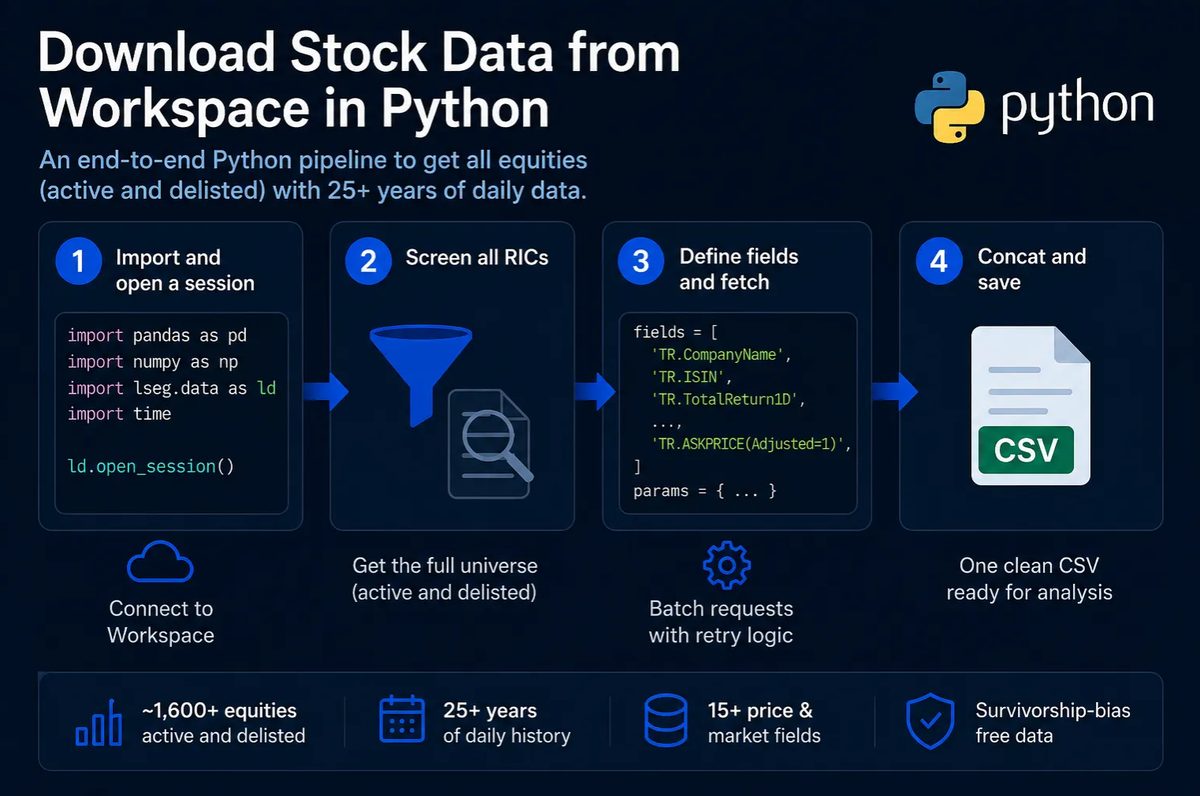
The LSEG documentation does not include a simple end-to-end script you can copy, paste, and run, so I wrote one.
The script has four steps, from opening a session to saving everything in one CSV, a plain-text table file. I use Sweden as the example, and Step 2 shows where to change the country.
You need an LSEG Workspace licence, with Workspace running on your computer. Install the lseg.data Python package with pip install lseg.data. The package sends its requests through Workspace, so it returns only the data your licence covers. With those in place, each block runs as written.
What the script downloads
- About 1,655 Swedish stocks from the screen in Step 2, active and delisted
- 15 daily fields: identifiers, returns, prices and liquidity, how easily a stock trades
- Daily data requested from January 2000 to May 2025 in SEK, and less for a stock listed later or delisted earlier
- One CSV that includes delisted stocks
Step 1. Importing and opening a session
I import three modules and open a session.
import time
import pandas as pd
import lseg.data as ld

# Every get_data call below needs an open session.
ld.open_session()
Step 2. Screening all RICs
RIC is LSEG’s instrument code. A RIC is like a ticker, and it is unique across every market LSEG covers.
One call to the API, the interface that code uses to request data, returns the universe, the list of stocks that the screen defines. The screen has three conditions: every primary-listed equity, active or inactive; the country code SE; and a listing status of delisted (DEL) or listed (LIS). Without the delisted stocks, the sample would hold only the stocks that survived to today, and results computed on it would have survivorship bias. The country code is the one LSEG records for each company, whichever exchange lists the stock: in a later run of the same screen, about 470 of its 1,658 stocks were listed outside Nasdaq Stockholm. The call returns a table with one row per instrument, holding its RIC and its ISIN, the international securities identification number.
screener = ld.get_data(
    universe=(
        'SCREEN('
        'U(IN(Equity(active or inactive,public,private,primary))), '
        'IN(TR.RegCountryCode,"SE"), '
        '(Contains(TR.InstrumentListingStatusCode,"DEL") '
        'OR Contains(TR.InstrumentListingStatusCode,"LIS"))'
        ')'
    ),
    fields=["TR.RIC", "TR.ISIN"]
)

# get_data returns the columns in the order I asked for them, so I name them by position:
# the matched instrument, then the two fields.
screener.columns = ['Instrument', 'RIC', 'ISIN']

# Keep each non-missing RIC once and turn the column into a list.
rics = screener['RIC'].dropna().unique().tolist()

# Drop blank codes and codes made only of spaces, which would fail the next request.
rics = [ric for ric in rics if ric and str(ric).strip()]

print(f"{len(rics):,} RICs to pull")
Swap "SE" for another country code, such as "US", "GB" or "DE", and change the currency in params in Step 3 to match.
Step 3. Defining the fields and fetching
I pull 15 fields per stock. Add or remove fields to fit your test.
fields = [
    # Identifiers
    'TR.CompanyName',
    'TR.ISIN',
    # Returns and date
    'TR.TotalReturn1D',
    'TR.TotalReturn1D.Date',
    # Size and liquidity
    'TR.CompanyMarketCap',
    'TR.DailyValueTraded',
    'TR.EV',
    # Volume-weighted average price (VWAP), with the default setting and with Adjusted=1
    'TR.TSVWAP',
    'TR.TSVWAP(Adjusted=1)',
    # Price range
    'TR.LOWPRICE(Adjusted=1)',
    'TR.HIGHPRICE(Adjusted=1)',
    'TR.LOWPRICE(Adjusted=0)',
    'TR.HIGHPRICE(Adjusted=0)',
    # Bid and ask
    'TR.BIDPRICE(Adjusted=1)',
    'TR.ASKPRICE(Adjusted=1)',
]

params = {
    'scale': 6,            # millions
    'SDate': '2000-01-01',
    'EDate': '2025-05-31',
    'Frq':  'D',           # daily
    'Curn': 'SEK',
}
Curn asks for prices and amounts in Swedish kronor, and scale 6 asks for amounts in millions, so a market capitalisation (share price times number of shares) of 1,200 means SEK 1.2 billion. Each request returns a table with a row for each stock and date and a column for each field. Search SCREENER inside LSEG Workspace to look up field names, country codes, and currency codes.
LSEG slows down or refuses large requests, so the loop below asks for five RICs at a time and tries each batch up to three times. Each non-empty table LSEG returns goes into results, and each batch that fails every attempt goes into errors, with its RICs.
BATCH_SIZE  = 5      # RICs per request; LSEG throttles larger ones
BATCH_DELAY = 1.0    # seconds to pause between batches
MAX_TRIES   = 3      # attempts at one batch before giving up on it


def fetch_batch(batch):
    """Ask LSEG for one batch of RICs, retrying a few times.

    Returns (frame, None) once a request succeeds, or (None, error text) if every
    attempt failed. A single transient failure should not end a run of several hundred
    requests, which is the only reason the retry loop exists.
    """
    for attempt in range(MAX_TRIES):
        try:
            return ld.get_data(batch, fields, params), None
        except Exception as error:
            if attempt < MAX_TRIES - 1:
                # Wait 2 seconds, then 4. Backing off gives a throttled service time to
                # recover.
                time.sleep(2 * (2 ** attempt))
            else:
                return None, str(error)[:200]


results = []
errors = []

for start in range(0, len(rics), BATCH_SIZE):
    batch = rics[start:start + BATCH_SIZE]
    frame, error = fetch_batch(batch)

    if error is not None:
        errors.append({'batch': batch, 'error': error})
    elif frame is not None and not frame.empty:
        results.append(frame)      # an empty frame means LSEG returned no data for these RICs

    time.sleep(BATCH_DELAY)        # pause whether the batch worked or not

# errors is filled in the loop above, so read it back rather than leaving it unseen.
if errors:
    print(f"{len(errors)} batches returned an error and were skipped")
For ~1,655 RICs at 5 per batch, that is 331 API calls. My run took roughly an hour end to end.
Step 4. Combining the batches and saving
I combine the batch frames into one table and write it to a CSV.
df = pd.concat(results, ignore_index=True)
df.to_csv('swedish_stocks.csv', index=False)
The CSV now holds the daily fields, from January 2000 to May 2025, for every stock LSEG returned data for. A batch that failed all three attempts is in errors, with the RICs it held, so check that errors is empty before you use the file. If it is not, the RICs in errors are missing from the CSV. LSEG also limits how much data you can download each day, and once you have downloaded that much, every request fails until midnight, your local time.
If you want to reopen the file later, Lesson 16 covers loading a CSV into pandas and Lesson 22 covers splitting it by RIC.
LSEG Workspace is one of four routes to price data. How do I get market data into Python? compares them, including the free ones and what they leave out.
Conclusion
The takeaway is that one screen that includes delisted stocks, and requests in small batches with retries, give a daily panel free of survivorship bias in one CSV, complete once errors is empty.
Read next
- Connect to IBKR with Python The broker route to the same daily bars, read-only through a paper IBKR account and into pandas with
ib_async. - Download tick data from LSEG Tick History in Python A download script for Tick History, which returns trades and quotes to the microsecond through a separate API and its own login.
- Download US insider trading data from LSEG Workspace in Python A download script for US insider trades from the same LSEG session.